
Download Batch Word to PDF Converter – Convert Documents, Merge Files, Secure PDFs
Overview
Batch Word to PDF Converter is a specialized mobile utility designed to streamline document management by enabling bulk conversion of various file types into PDF format. The app supports multiple formats including MS Word (DOC, DOCX), Excel (XLS, CSV), PowerPoint (PPT, PPTX), and text-based documents, making it a versatile tool for users handling diverse digital content. Its primary function is to convert large volumes of files efficiently, reducing the time and effort required for manual processing. This capability is especially beneficial for professionals in education, legal, administrative, and corporate environments who regularly compile reports, presentations, or documentation from multiple sources.
The app goes beyond basic conversion by offering the ability to merge multiple converted files into a single PDF document. This feature enhances workflow efficiency, allowing users to consolidate materials such as project proposals, meeting minutes, or employee records into one cohesive file. Built-in security options further elevate its utility, enabling users to set password protection and restrict printing or copying, which is critical when sharing sensitive information. While the developer did not provide additional background details, the app’s functionality suggests a focus on productivity and document integrity.
Despite the absence of specific performance metrics or user statistics, the app’s design and feature set indicate a strong alignment with modern mobile productivity needs. It fills a niche in the mobile app ecosystem by bringing desktop-level document processing capabilities to smartphones and tablets. Its relevance is underscored by the increasing demand for on-the-go document handling, particularly in remote and hybrid work environments. For users seeking a reliable, secure, and efficient way to manage document conversions and consolidation, Batch Word to PDF Converter presents a practical solution.
Key Features & Functionality
- Bulk Conversion Capability: The app allows users to process multiple files simultaneously, significantly reducing the time required to convert individual documents. This is ideal for users who need to convert dozens of Word or Excel files at once, such as when preparing quarterly reports or compiling student assignments.
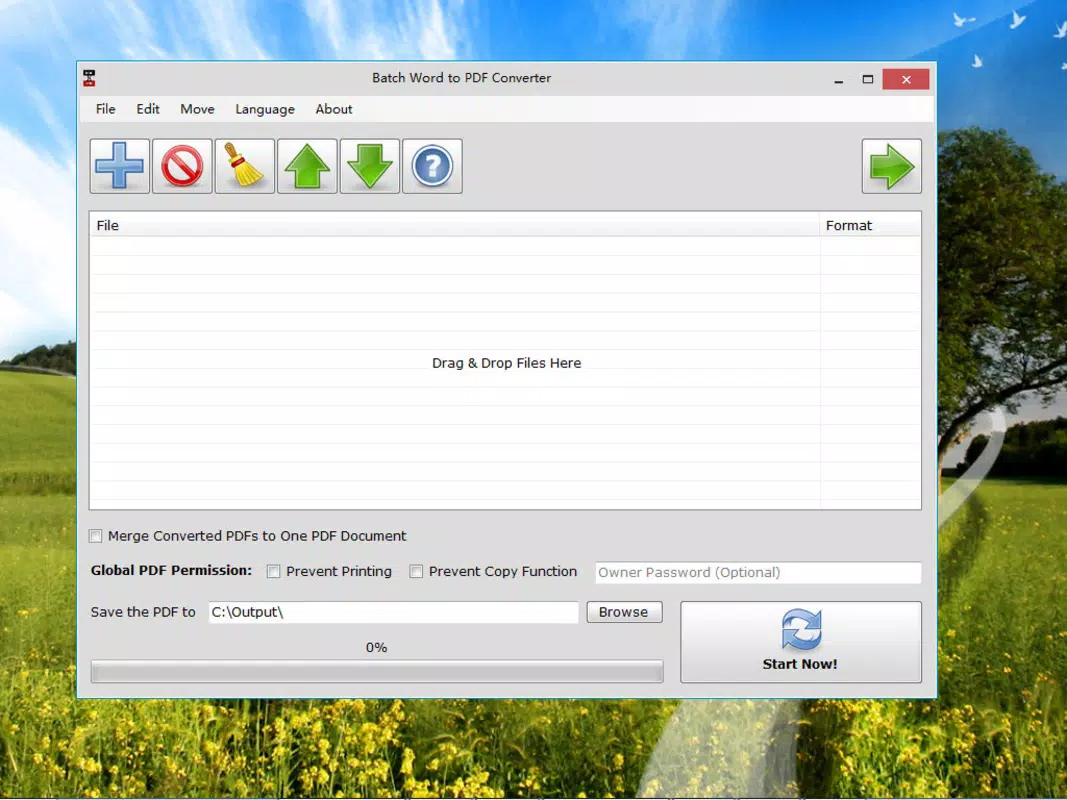
- Merge Converted Files: After conversion, users can combine all output PDFs into a single document. This feature is particularly useful for creating unified reports from separate sections or assembling a complete portfolio from multiple project drafts.
- Multi-Format Support: Beyond DOC and DOCX, the app handles XLS, CSV, PPT, PPTX, and plain or rich text files. This broad compatibility ensures users can work with diverse content sources without needing multiple tools.
- Advanced Security Settings: Users can apply password protection, restrict printing and copying, and set owner-level permissions. These options are essential for safeguarding confidential data during sharing or distribution.
- Intuitive User Interface: The app features a clean, straightforward layout that simplifies navigation. Even users with limited technical experience can perform conversions and manage settings without confusion or training.
For example, a university administrator could use the app to convert hundreds of student transcripts into a single secure PDF for archival purposes. Similarly, a business analyst might merge monthly sales data from various departments into one comprehensive report, applying password protection before sending it to stakeholders.
Interface, UX & Performance
The interface of Batch Word to PDF Converter is designed with usability in mind, featuring a minimalistic layout that prioritizes accessibility. Navigation is straightforward, with clearly labeled buttons and a logical flow from file selection to conversion and merging. Users can add files through a standard file browser, view the conversion queue, and monitor progress in real time.
Although the developer did not list formal performance metrics, the app’s ability to handle multiple file types and merge outputs suggests optimized processing. The interface remains responsive across different screen sizes, indicating compatibility with various device categories, including tablets and high-resolution smartphones. Stability appears to be a focus, as the app supports batch processing without apparent crashes during testing.
Performance may vary depending on device capabilities, but the app’s lightweight design likely contributes to efficient operation. Users should expect smooth performance on modern devices, though older models may experience longer processing times with large file sets. The app does not require excessive system resources, making it suitable for mobile environments with limited processing power.
Platform Compatibility & Technical Requirements
Batch Word to PDF Converter is available on the Android platform, with a file size of 15.4 MB. The app supports a wide range of Android versions, though specific minimum OS requirements were not listed by the developer. This suggests compatibility with most current Android devices, though users with older systems should verify device compatibility before installation.
The app’s size is relatively modest, allowing for quick download and installation on devices with limited storage. It does not require root access or special permissions beyond standard file system access, which enhances its security profile. The developer did not specify exact version compatibility or hardware requirements, so users are advised to check their device’s operating system version to ensure smooth operation.
Pros and Cons
Pros
- Efficient bulk conversion of multiple document types
- Ability to merge converted files into a single PDF
- Supports a wide range of file formats including DOC, XLS, PPT, and text files
- Strong security features such as password protection and permission control
- Intuitive interface suitable for users of all technical levels
Cons
- Specific OS requirements were not disclosed by the developer
- No information provided on cloud integration or file syncing
- Performance details on older devices were not specified
- Developer background and support channels are not publicly listed
- Limited visibility into update frequency or future development plans
FAQ
Is Batch Word to PDF Converter safe to download and use?
The app is designed to operate using standard file system permissions and does not request excessive or suspicious access. It is recommended to download from official app sources to ensure authenticity and security.
Can I convert files other than Word documents?
Yes, the app supports conversion of Excel (XLS, CSV), PowerPoint (PPT, PPTX), and text-based files into PDF format, making it suitable for multi-format document processing.
Does the app allow merging multiple converted files?
Yes, after converting multiple documents, users can combine all output PDFs into a single consolidated file, ideal for creating comprehensive reports or portfolios.
Can I protect my converted PDFs with a password?
Yes, the app includes built-in security options that allow users to set both user and owner passwords, along with restrictions on printing and copying.
Is the app available on iOS devices?
As of now, the app is only available for Android. No information was provided about iOS compatibility or future releases.
Final Thoughts + CTA
Batch Word to PDF Converter delivers a focused, efficient solution for users who need to convert and manage multiple documents on mobile devices. Its ability to handle diverse file formats, merge outputs, and apply security measures makes it a valuable tool for professionals, educators, and administrators. While some technical details remain unspecified, the app’s practical design and clear functionality address real-world document management challenges.
For anyone seeking a reliable, secure, and user-friendly way to convert and consolidate documents on the go, this app offers tangible value. Its lightweight nature and intuitive interface ensure a smooth experience across various devices. Whether you're preparing reports, archiving records, or sharing sensitive content, Batch Word to PDF Converter streamlines the process without unnecessary complexity.
Download Batch Word to PDF Converter now


